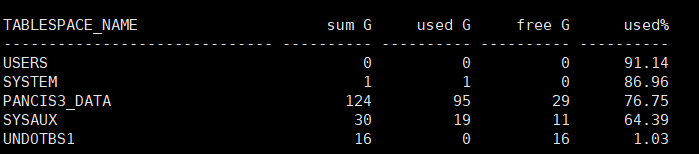
查询表空间使用率发现辅助表空间使用率偏高
set linesize 180;
set pagesize 999;
col tablespace_name for a30
col extent_mg for a10
col “tot_space/G” for a15
col “used/G” for a10
col “free/G” for a10
col “usage%” for a10
select a.tablespace_name,
round(a.bytes / 1024 / 1024 / 1024, 0) “sum G”,
round((a.bytes – b.bytes) / 1024 / 1024 / 1024, 0) “used G”,
round(b.bytes / 1024 / 1024 / 1024, 0) “free G”,
round(((a.bytes – b.bytes) / a.bytes) * 100, 2) “used%”
from (select tablespace_name, sum(bytes) bytes
from dba_data_files
group by tablespace_name) a,
(select tablespace_name, sum(bytes) bytes, max(bytes) largest
from dba_free_space
group by tablespace_name) b
where a.tablespace_name = b.tablespace_name
order by ((a.bytes – b.bytes) / a.bytes) desc;
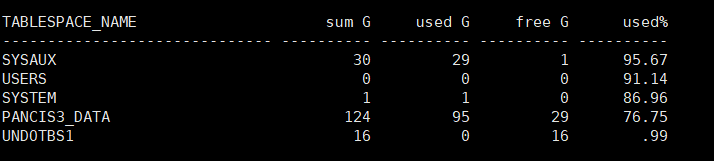
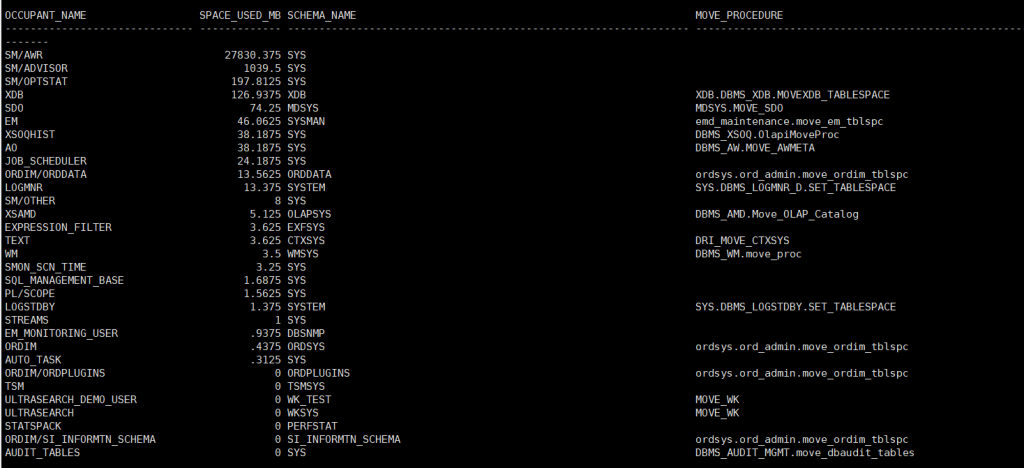
定位占用空间的对象
col OCCUPANT_NAME for a30
SELECT occupant_name,
space_usage_kbytes / 1024 AS space_used_mb,
schema_name,
move_procedure
FROM v$sysaux_occupants
ORDER BY space_usage_kbytes DESC;
查看具体对象大小
select OWNER,
segment_name,
segment_type,
PARTITION_NAME,
bytes / 1024 / 1024 / 1024 Size_GB
from dba_segments
where tablespace_name = ‘SYSAUX’
order by Size_GB desc
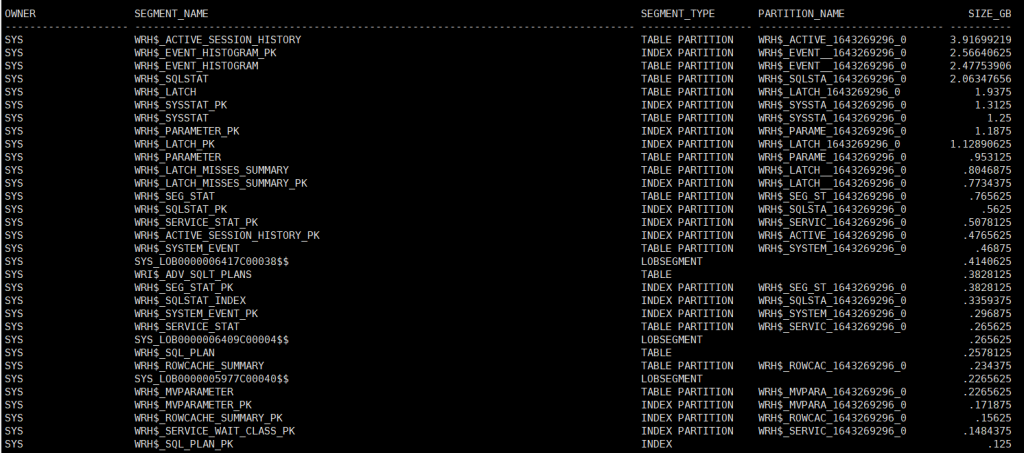
发现WRH$_ACTIVE_SESSION_HISTORY和WRH$_EVENT_HISTOGRAM等AWR相关表占用大量空间
WRH$_ACTIVE_SESSION_HISTORY:与AWR相关,存放活动会话历史
WRH$_EVENT_HISTOGRAM:记录等待 事件 直方图
二、解决方案:清理AWR历史数据
1、清理特定分区数据
ALTER TABLE WRH$_ACTIVE_SESSION_HISTORY TRUNCATE PARTITION WRH$_ACTIVE_1643269296_0;
也可以使用
truncate table WRH$_ACTIVE_SESSION_HISTORY;
truncate table WRH$_EVENT_HISTOGRAM;
或
execute dbms_workload_repository.drop_snapshot_range(low_snap_id => 0, high_snap_id => 99999999);
execute dbms_workload_repository.purge_histogram_history;
2、验证清理结果
已释放